Hi, I hope everyone is enjoying there January and getting ready to go back to school, or if your already at school I hope it is going well for you, and if your at a job i hope that is going well for you as well!
If your a Non-User to 3D software I would like to offer my advice on how you can use this to help better your life and also make your creative mind come to life.
If your working at a job and you are wanting to work up the corporate ladder having other skills besides the ones you currently have, could benefit you in going up that ladder.
When your boss says to the team members that they are looking into branding there company to the internet to get more exposure and to increase more revenue. You could say that i have the skills to make a really killer website design and logo to help with exactly that problem
With software like Maya or Blender or 3ds Max or Goolge Sketch up, you can create those types of logos and or images that your job is exactly looking for.
In this way you can help your team and company with there problem and help yourself in getting recognized in going above and beyond your job and hopefully in getting a pay raise or promotion for your job.
If your a student that is working lets say a job at a cash register on campus and they are looking for making there food stand or student store get more revenue. They can say they really need someone to make flyers to help with promoting there products and or services they provide. You could be that student that learns that 3D software like Maya and or Blender and use Photoshop another software to create those banners to help with getting your job more revenue.
In turn this will get your job more money and more people to visit your store or stand, and help you get more sales and more money in your pocket.
Learning 3D software is something everyone should look into, as a way to better one's job and get recognized as a creative, and talented person.
I would give some insight in learning 3D software and will put some links to places where you can check it out more.
http://www.maxon.net/
http://www.sketchup.com/
http://www.blender.org/
Everyone have a great evening,
Cheers
Friday, January 17, 2014

Thursday, January 16, 2014
3rd Software Review "Rhino 5" Offical
This Review is a Overview of the Features in this Software.
Rhino 5
This software 450MB in size when downloading it on there website and the footprint for that on a computer is rather small when you compare it to Maya or 3Ds Max Software.
This Rhino 5 is a software that is very different in the way you use the natural keystrokes on a keyboard and using a mouse. It has a interface that remind you of Maya but it doesn't act like it. The interface does take some time to learn as is any new interface that you will learn, the shortcut keys in this are very different then most 3D Software's.
 | |||
| Rhino 5 Interface |
This Software when you want to move say inside the workspace you have to hold down the SHIFT+the right mouse click button down and move the mouse left or right to move inside the workspace. Very different if your a user of Maya or Blender or most other 3D software's.
The tool that you use to move objects inside the workspace is called "Gumball" which highlights the object with the locators move tools to go X,Y,Z and or scale the object.
 |
| Gumball Tool |
The Open GL inside the workspace is a very nice bonus to users, and you can render the objects in real time with shadows and reflections well working on your model.
There is a lot of use of Curves in this software package, as it really has a lot of tools to connect two curves to create a full 3D object from it.
The Rhino 5 Software has a lot more aspects to it and I will link to a review of it in full from Rhino Tutorials in this link Rhino Tutorial 5 Overview
Buying Rhino 5
In my recommendation I would highly consider purchasing this software if your a really big fan of using curves in your workflow and also have a high powered GPU graphics card since it will use that for Open GL. I would also buy this if you are a wanting to try something new besides Maya or 3ds Max in your workflow.
Here is the link to buy
http://www.rhino3d.com/sales/north-america/United_States
http://www.studica.com/us/en/RobertMcNeel/robert-mcneel-rhino-5/r50-e.html?utm_source=google&utm_medium=ppc&kpid=567707&gclid=CJ-r3J7JhLwCFWMV7AodqBoADg
One Min Tip for Blender
A One Min Tip for Blender Users out there.

If your having trouble with using the cycles render engine and you have fireflies in the scene which are the specks in the scene that are very bright in your render, if you want to clean this up here is what you do.
Go down to Light Paths in your Render Settings and click on No Caustics and click on Filter Glossy and set it to 1.00. This will help with your images looking clear and have little or no fireflies in the scene.
Have a great evening!
Wednesday, January 15, 2014
Blender Review on Software Tools "Simulation Tools"
Blender "Simulation Tool"
In Blender there are simulations tools that you can use to create a variety of cloths and water and fog and a lot of other effects with this program.
In blender it is located the right hand corner with a little icon that shows up as a check mark with a circle on the right part of the checked icon.
To for example create a cloth simulation in this program you create a plain which you just shift A and select mesh/plain and click that to create a plain and then TAB and click W on the keyboard and Click Subdivide about 3 times and then click TAB to get out of that. Then you select the plain and click Cloth in the Enable Physics Panel which i will show below this.

Then you have a lot of settings to choose from to create the sim, i would just leave the settings at default for now and then what you want to do is say if you want to make a flag move you would first go to the Mesh Plain you made and select the tool Weight Paint tool and select the vertices on the first row on the plain vertically and select all of them by holding down the SHIFT and ALT button well clicking the right mouse button to select the first ROW of vertices in the plain. Then you go to the icon that has 3 Circles connected to the shape of a Triangle like this

Then you click on Vertex groups and click the plus sign on the right hand side and it will make the weight paint show up as Red on the those first row of vertices, and now you can close out of the weight paint mode by clicking to Object Mode

Now back to the Cloth Sim settings you click on pinning check mark it and then under this icon you click the group that you made for the Weight paint mode.

Now below that you want to click Cloth Collision and then Self Collision and then you want to add a wind to the flag to make it move, and you do that by SHIFT+A and select force field and select wind and then you position the wind in the path of the flag and angle it from the top view to be slightly to the right a bit by a few degrees. That is to make the flag wind not just stand still if you made dead on straight it wouldn't move so that is why you do this.
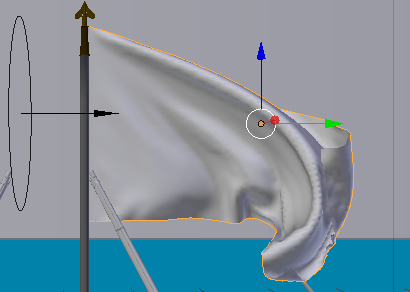
then under the settings that say Back under the Cloth Sim you will click Bake and your Simulation will take some time about a few minutes or so maybe longer, depending on what type of computer you have and then your flag sim will be working for you.
3rd Review Preview-Rhino 5 Software
Review Preview
Will be Reviewing Rhino 5 Software which is a 3D software that I will review soon and if your interested in this give this blog a view in a the next couple of days.
3D-software-review
Tuesday, January 14, 2014
2nd Review 3D software "Blender 3D"
My Choice Review
In this software I am going to be covering Blender 3D which is an Open Source Free Software. This Software was developed by the Founder Ton Roosendaal. This software is always being updated and right now I have the latest update and want to type up a review about why you should check it out.

Performance
"Disclaimer I am using my own setting on my PC that I personally made and so the performance could be slower or faster depending on what type of computer you have"
This software leaves a small footprint in the installing phase it has about 200mb+ size to put on your hard rive a lot smaller then a lot of the other big software packages out there. It is very fast moving around and it has no lag and even if you put a million polygons in there it will move, but when you do simulation in there is when it will start to slow down for you.
The Tool inside
This software since its Open Source it always has something new added to it every update which seems to be about every month which is very good for having a 3D software update that quickly. The tools they put are from Modeling to Rotoscoping and everything in between. It is an ALL IN ONE package that is for people trying to make 3D art or CGI short films on a budget. The Modeling tools in Blender are very intuitive but their interface is very different then most 3D packages, so you have to take some time to learn that. I will recommend a few books in the links below that I used that will make your use of Blender faster.
The Modeling has a lot of tools like the basic create cube and create triangle, and also shortcut keys like Shift+A to open up a panel to add a Cube or Triangle. There are Modifiers that you can add on the

This can duplicate the object like say a cube and make many copies of it without have to duplicate a cube 5 times to make this same scene. Also when you have that connected to the object you can edit the object of the first cube and the rest of the cubes will be affected as the first cube has been.
There are tools like UV Editing shown below

That help in unwrapping your tools and help with applying textures to your object.
The layout of this software can be changed to many types and even able to customize it, the layout for the Compositing is like this seen below

There is a lot of ways to speed up your workflow with this type of ability in this software, and you can create hyper realistic images with this render engine that is built in to blender called Cycles with an image to show what I can do below these words.
 |
| Created in Blender by Me |
If you're a 3D Modeler
This product is worth a try to check out, the interface is a bit different but if you want to take the time to learn it you can create images that are just as good as the other programs out there. This does have some drawbacks with trying to learn the program since it is very different but I will link to some books below to give you the fast track in learning this software.
Where to buy
With this software it is Free and so if you want to go to their site which I will link below you should check it out and download it they have Windows and Mac downloads and Linux as well.
First Review Software-Cinema 4D R15 Studio
My Choice Review
This software review for the Cinema 4D Studio Edition the
product price is very steep, although the product will pay off in the amount of
work you can get done and the workflow speed.
The quality of the product is very clean and streamline for the consumer
and it gives a new user a very easy way to learn the software in a quick amount
of time.
Performance
“Disclaimer I am
using my own setting on my PC that I personally made and so the performance
could be slower or faster depending on what type of computer you have”
In the performance
aspect there was a very easy navigation inside the program once installing it
on my PC. There was no lag or very
little or no sluggishness in using the program.
When making a huge scene however was when it started to slow down but if
your using a few million polygons in a scene with hair or fur the software
going to slow down your computer whatever software your using.
The Tools inside
The tools that Cinema 4D had were a lot of way to complete a
task from adding a cube in the tool bar, to adding modifier on top of the cube
without having to edit the cube itself.
There is a also lot of tools like right clicking on the object you can
get a drop down menu on what to do to it, like say Bevel or Extrude from the
object. You have to click first to make
it Editable so you can do that, but it’s a very non-destructive format with
this software. There are also short cut
keys in the program where there is if you click on the object and press the T
button on the keyboard it makes the object scale, and if you click E you can
Rotate the object and if you hold the right button mouse click and scroll the
mouse forward and back you can scale the object that way too.
If you’re a 3D
Modeler or Animator
This product is a great product that has many ways of
getting your workflow up and running as soon as you start a project. Granted you have to learn the interface for a
few days, but you will soon make it up by the amount of time you save with this
piece of software. If you want to
animate with this product this gives you many tools to create your animations
with, one of the Bright Spots in this is when you animate a object you get a
graph that shows up in the interface of the workplace your working on and shows
you like if you are moving a leg to walk.
This will show up and have the arc that it makes when the legs moves on
your character. This is very handy to
have and I personally feel that it speeds up your animation workflow.
The texture and realism in this program is very great, I have
created an object that I will place in this review in just about 20-30 minutes
of time to make and render.
 |
| Interface of Cinema 4D R15 Studio |
If you’re a Hobbyist
 |
| Strawberry made from 3D |
This Product is a something that if you want to go into what
the Professionals use that by all means go for using this type of
software. This type of product is expensive
and If you don’t have the money for it right now then save up for it, but in
the mean time I would at least get a demo version of this and see if you like
it. If you really love this product then
go for it and buy it.
Video of Review of Cinema 4D studio Cinema 4D Studio
Video of Review of Cinema 4D studio Cinema 4D Studio
Where to buy
There are few sites that you can buy this product at and I will
recommend them in the links below on my sites so you can go look at the product
and hopefully purchase. Thanks again for
reading this review and have a great day!
http://www.amazon.com/Maxon-Cinema-4D-Studio-R15/dp/B004M145AY/ref=sr_1_8?m=A2HX2MRG96ONB3&s=merchant-items&ie=UTF8&qid=1389748541&sr=1-8&keywords=cinema
http://www.amazon.com/Maxon-Cinema-4D-Studio-R15/dp/B004M145AY/ref=sr_1_8?m=A2HX2MRG96ONB3&s=merchant-items&ie=UTF8&qid=1389748541&sr=1-8&keywords=cinema
Subscribe to:
Posts (Atom)


